
Best Free SPSS Alternatives for Researchers (2026)
The best free SPSS alternatives for researchersarejamovi, JASP, GNU PSPP, and R, but they solve different versions of the same problem. For most researchers who want to leave IBM SPSS Statistics without immediately…
Best Free SPSS Alternatives for Researchers
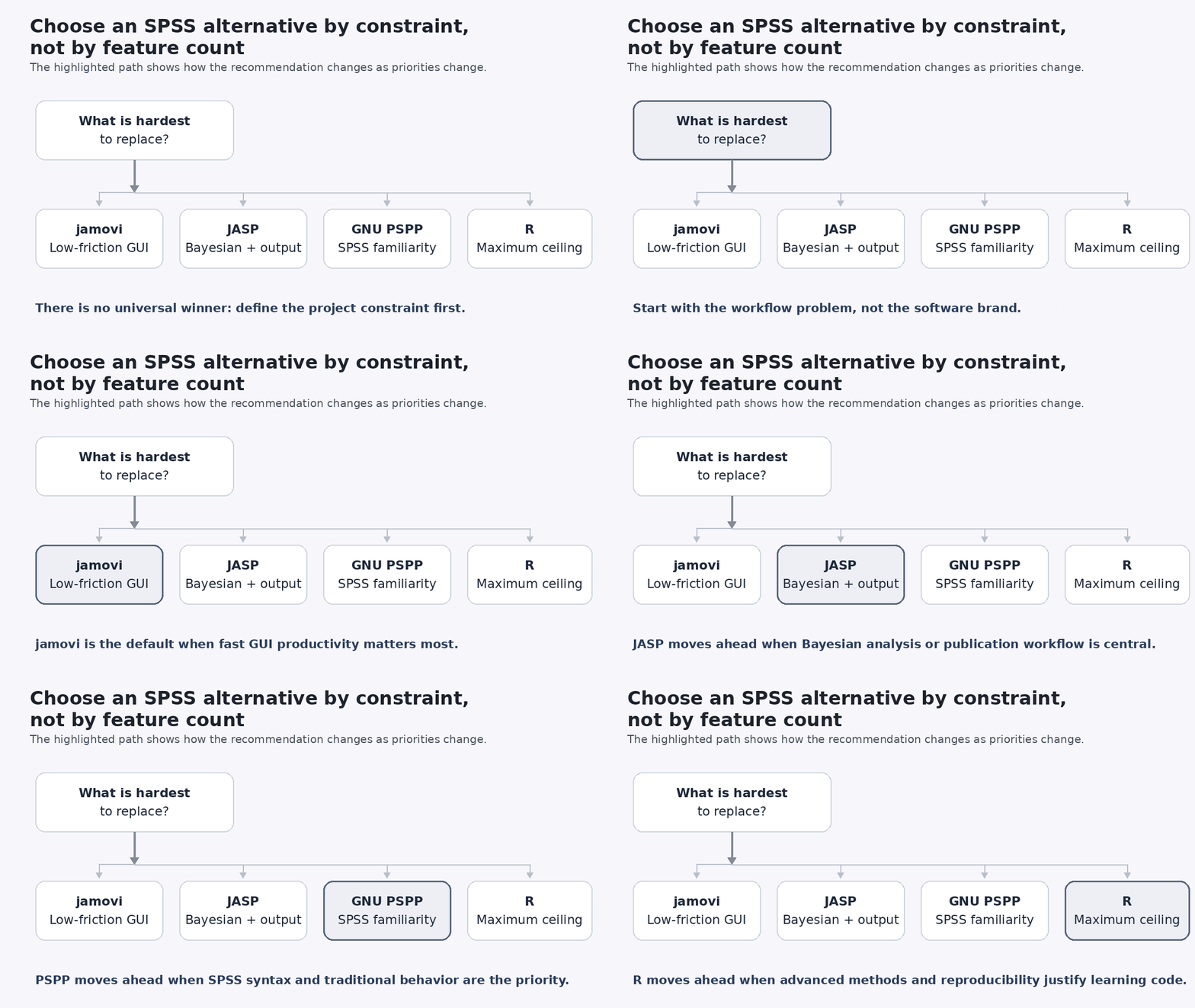
The best free SPSS alternatives for researchers are jamovi, JASP, GNU PSPP, and R, but they solve different versions of the same problem. For most researchers who want to leave IBM SPSS Statistics without immediately learning programming, jamovi is the strongest starting point. JASP is a better fit when Bayesian analysis and publication-oriented output are central, PSPP when SPSS-style familiarity and syntax compatibility matter most, and R when advanced methods and reproducibility justify a larger learning investment.
The choice matters because replacing SPSS is rarely just a licensing decision. A researcher may need to preserve .sav metadata, reproduce a repeated-measures model, satisfy a supervisor, collaborate with SPSS users, or finish a thesis before there is time to learn a new programming language. The best option is therefore the one that satisfies the hardest requirement in the real research workflow.
What Are the Best Free Alternatives to SPSS in 2026?
Quick answer: jamovi is the best general starting point for many SPSS migrants; JASP is especially strong for accessible frequentist and Bayesian analysis; GNU PSPP prioritizes traditional SPSS compatibility; and R offers the highest analytical ceiling. All four can be used without an SPSS subscription, but they differ sharply in workflow, extensibility, and migration effort.
| Software | Best fit | Interface | SPSS migration | Main strength | Main trade-off |
|---|---|---|---|---|---|
| jamovi | Most researchers moving from SPSS | Modern point-and-click GUI | Direct .sav import | Easy GUI with R underneath | Specialized work may depend on modules |
| JASP | Bayesian, psychology, behavioral research | Modern point-and-click GUI | Direct .sav/.zsav/.por import | Frequentist + Bayesian workflows | Advanced depth varies by module |
| GNU PSPP | Traditional SPSS users | SPSS-style GUI + syntax | Strong SPSS system/syntax compatibility | Familiarity and no license fee | Narrower procedure coverage than SPSS |
| R | Advanced and reproducible research | Code-based; often used with RStudio | Via packages such as haven | Extensibility and reproducibility | Highest learning investment |
jamovi officially reads SPSS .sav files directly, includes common analyses such as t-tests, repeated-measures ANOVA, linear and logistic regression, reliability, PCA, EFA and CFA, and adds specialized methods through a library of more than 70 community modules. It also exposes the R code behind analyses. jamovi documentation
JASP is an open-source project supported by the University of Amsterdam. Its core identity is the combination of classical and Bayesian procedures in one GUI, with APA-oriented copying of tables and figures. Its current module library includes areas such as SEM, survival analysis, meta-analysis, machine learning and robust statistics. JASP features; JASP module library
GNU PSPP explicitly describes itself as a free replacement for SPSS. It emphasizes a familiar graphical interface, SPSS-compatible system and syntax files, and conventional procedures including descriptives, t-tests, ANOVA, linear and logistic regression, reliability, factor analysis, clustering and non-parametric tests. GNU also states that PSPP remains incomplete relative to the full procedure coverage of the software it replaces. GNU PSPP; PSPP manual
R is a free software environment for statistical computing and graphics. Unlike the GUI alternatives, it is designed around code and packages rather than a fixed menu of procedures. That makes it harder to learn initially but much less likely to become the limiting factor when research methods become specialized. R Project
Why Researchers Look for Alternatives to IBM SPSS
Cost is an obvious reason, but it should be described accurately. As of August 25, 2026, IBM’s public U.S.-dollar product page lists the SPSS Base subscription starting at US$109 per authorized user and explicitly notes that displayed prices are indicative, may vary by country, and depend on local availability. IBM also offers traditional, campus, student and add-on licensing routes. IBM SPSS Statistics
For researchers, however, license price is only part of the decision. Institutional access can disappear after graduation or a job change. Collaborators may need to reopen analyses months later. Journals, supervisors, funders or internal review processes may expect a transparent record of preprocessing and model choices. A statistical workflow that cannot be reconstructed creates a problem even when the software itself is easy to use.
There are also situations where staying with SPSS is sensible. A project may depend on established SPSS syntax, Complex Samples, Missing Values or another specialist module, an institutional template, an audited production workflow, or collaborators who exchange SPSS files routinely. IBM continues to maintain specialist capabilities including Complex Samples and Missing Values. IBM SPSS features
What Should Researchers Look for in an SPSS Alternative?
The most useful selection criterion is not the number of features. It is the hardest requirement in the project. A package that handles almost every common statistical test can still be the wrong choice if the one missing procedure is the model required by the research protocol.
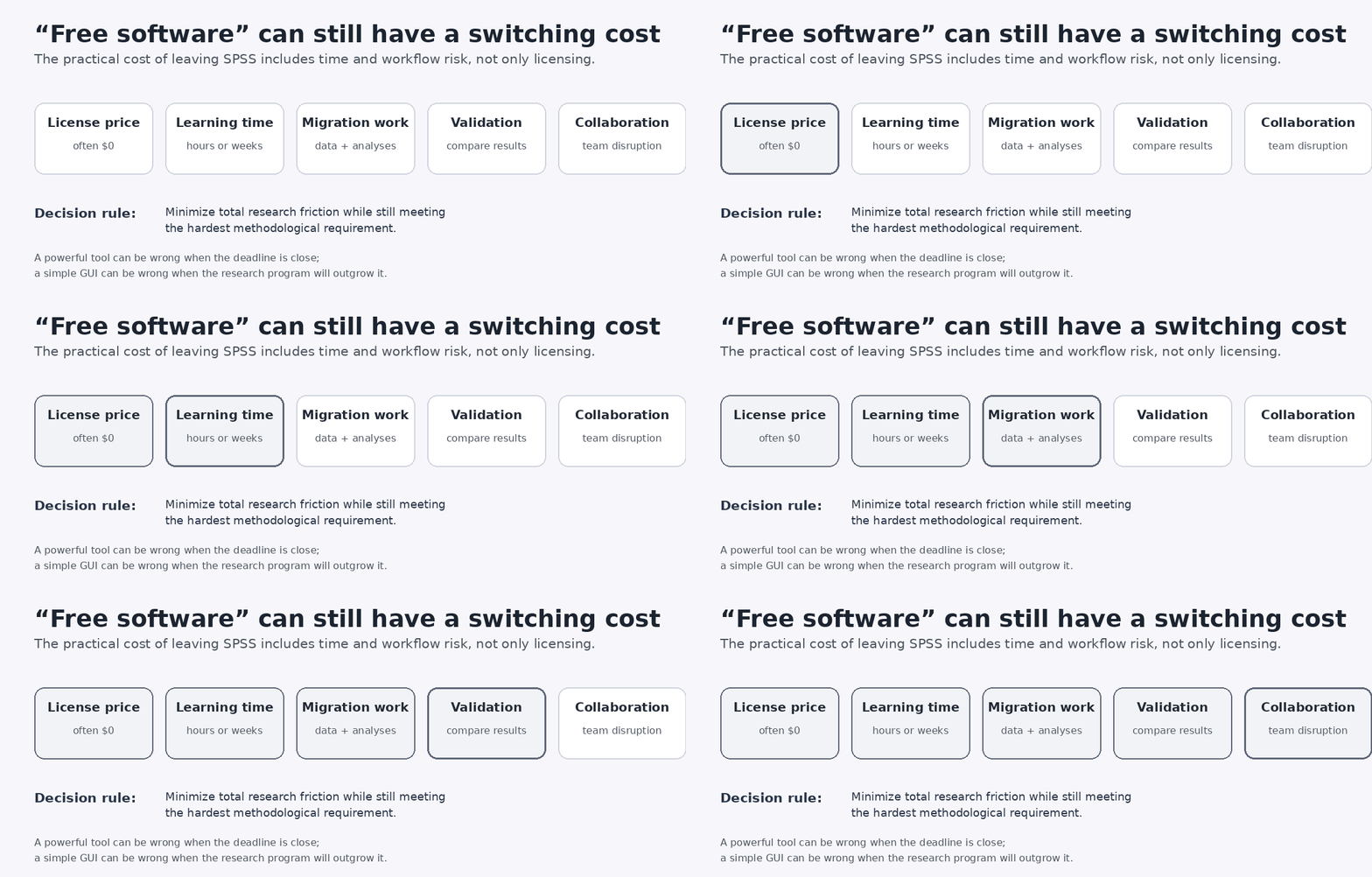
A second criterion is switching cost. Free statistical software can have a zero license fee while still consuming substantial research time. The practical cost includes learning the interface or language, moving data and metadata, reconstructing analyses, validating results and coordinating with collaborators.
A third criterion is reproducibility. A point-and-click workflow is not automatically irreproducible, and code is not automatically reproducible. What matters is whether transformations, exclusions, weighting, model options, software versions, modules or packages, and analytical decisions are preserved well enough for the work to be rerun.
Finally, distinguish free/open software from a commercial free tier or trial. Browser tools with guest access, sample-data modes or limited credits may still be useful, but they are a different proposition from software that can be installed or used without an ongoing paid plan for ordinary research work.
jamovi: Best Free SPSS Alternative for an Easy Transition
jamovi is the strongest default recommendation for researchers who want an SPSS-like point-and-click experience without freezing their long-term workflow at the GUI level. Its interface is spreadsheet-oriented, the core procedures cover much of routine social-science and behavioral research, and community modules extend the program into more specialized areas. jamovi features; jamovi modules
The strategic advantage is its relationship with R. jamovi runs on R and can show the R code behind an analysis. Its Rj module can run R inside jamovi, and its core analyses are also available through the jmv R package. That creates a plausible progression from SPSS menus to jamovi, then from visible R syntax to direct R work rather than forcing a researcher to switch paradigms in one jump.
For migration, jamovi directly opens .sav data. It also saves the data, analysis settings, options, results and plots together in an .omv project file. That is useful for reopening a study later or sharing a self-contained analysis with a collaborator. jamovi reproducibility and file support
The limitation is not that jamovi is restricted to “basic statistics.” Its module ecosystem is broad. The practical limitation is that a specialized analysis may depend on a particular module, so researchers should confirm the exact procedure, options and maintenance status before making it the foundation of a long project.
Best fit: researchers who need fast GUI productivity now but want a credible path toward R and more reproducible analysis later.
JASP: Best When Bayesian Analysis and Academic Output Matter
JASP is also a low-friction graphical alternative, but its identity is different. It was built around access to both frequentist and Bayesian analysis, making it particularly attractive in psychology, behavioral science and experimental research where Bayes factors or Bayesian versions of familiar tests are part of the workflow. JASP official overview
Publication workflow is another strength. JASP’s official site describes support for APA format when copying tables and graphs into Word, and it integrates with the Open Science Framework. That is more defensible than claiming that every output is automatically “fully APA 7 compliant,” because manuscript requirements still vary by analysis, journal and editor.
Older comparisons sometimes describe JASP as a mostly basic-statistics package. That is no longer a fair summary. Its current official module library includes SEM, survival, machine learning, meta-analysis, time-series tools, robust statistics and more. The correct limitation is that the depth and maturity of advanced workflows vary by module and method, so a researcher should check the exact model rather than rely on the category name alone. JASP module library
JASP can open SPSS .sav, .zsav and .por files. It also exposes analysis-specific R syntax, but its current FAQ states that this syntax runs within JASP rather than functioning as ordinary RStudio-ready code. That makes it useful for inspection and reproducibility inside JASP, but it is a different bridge to R from jamovi’s jmv-oriented workflow. JASP file formats; JASP R syntax FAQ
Best fit: researchers who want an approachable GUI with Bayesian analysis and convenient publication-oriented output as central requirements.
GNU PSPP: Best for Traditional SPSS Familiarity and Syntax Compatibility
GNU PSPP is the alternative that most deliberately tries to preserve the traditional SPSS way of working. GNU describes compatibility with the SPSS language as a project goal, and its quick tour states that system files and syntax files can often be used with little or no modification. PSPP also offers compatible algorithm and syntax modes for closer behavior when necessary. PSPP compatibility
That makes PSPP especially relevant when the actual need is not “give me every modern statistical method,” but “let me keep working with familiar SPSS-style data, syntax and conventional procedures without a license fee.” Its current feature set includes descriptive statistics, t-tests, ANOVA, linear and logistic regression, measures of association, clustering, reliability, factor analysis and non-parametric tests. GNU PSPP
PSPP should not, however, be described as SPSS with a different logo. The project is independent, not a copy of IBM code, and GNU’s own manual states that its statistical-procedure support remains incomplete relative to the full product it aims to replace. PSPP FAQ; PSPP manual
Best fit: SPSS users whose priority is preserving familiar data/syntax habits for conventional analysis rather than maximizing access to newer or highly specialized methods.
R and RStudio: Best for Advanced and Reproducible Research
R is fundamentally different from the other alternatives. R is the statistical computing environment; RStudio, developed by Posit, is an integrated development environment commonly used to work with R. Treating the two names as interchangeable obscures an important point: the analytical platform is R, while RStudio is one interface for writing, running and managing R code.
The reason R has the highest analytical ceiling is extensibility. The R Project describes R as a free environment for statistical computing and graphics, and its package ecosystem allows researchers to add methods far beyond the fixed procedure set of a desktop statistics package. R Project
For SPSS migration, the haven package can read .sav and .zsav files and write SPSS system files. It preserves variable labels and can represent SPSS-style user-defined missing values, but this also illustrates why migration requires judgment: haven’s default behavior converts user-defined missings to ordinary R NA values unless the researcher explicitly asks to preserve them. haven SPSS import documentation; haven conversion semantics
The learning cost is real. Researchers must become comfortable with objects, functions, packages, errors and code organization in addition to the statistics themselves. Under a tight thesis deadline, that can outweigh R’s theoretical advantages. Over a multi-year research career, the calculation often reverses because scripts can be versioned, automated, rerun and extended as methods become more complex.
Best fit: researchers who need the greatest methodological flexibility and are willing to invest in a code-based, reproducible workflow.
jamovi vs JASP vs PSPP vs R: Which Is Best for Your Constraints?
| Decision factor | jamovi | JASP | GNU PSPP | R |
|---|---|---|---|---|
| Fast point-and-click transition | Excellent | Excellent | Excellent for classic-SPSS users | Low initially |
| SPSS data import | Direct .sav | Direct .sav/.zsav/.por | Strong system-file support | Via packages such as haven |
| SPSS syntax continuity | Low | Low | Strongest of the four | Requires translation/rewrite |
| Frequentist core methods | Strong | Strong | Strong for conventional methods | Extensive |
| Bayesian workflow | Via modules/R | Core strength | Not a core strength | Extensive via packages |
| SEM / mixed / specialized models | Available through modules; verify exact needs | Available in current modules; verify exact needs | More limited overall | Very broad ecosystem |
| Complex survey work | Verify specific module/design | Not a primary strength | Limited relative to specialist tools | Strong specialist ecosystem |
| Publication workflow | Convenient | Particularly convenient | Conventional output | Highly customizable |
| Reproducibility path | Project file + R bridge | Saved analyses + internal R syntax | Syntax-driven workflow | Code + environment management |
| Long-term analytical ceiling | High with modules/R | High but module-dependent | Moderate | Very high |
| Learning investment | Low | Low | Low for SPSS users | High |
Easiest for beginners: jamovi and JASP are usually the simplest modern starting points; PSPP can feel even more familiar to someone trained on classic SPSS.
Closest to SPSS syntax and traditional behavior: GNU PSPP.
Strongest Bayesian GUI: JASP.
Best long-term analytical ceiling: R.
Best compromise between immediate GUI productivity and a future move into R: jamovi.
Which Free SPSS Alternative Is Best for Your Research Field?
Social science and education
jamovi is a strong default when the project relies mainly on descriptives, t-tests, ANOVA, regression, reliability and factor analysis. PSPP becomes more attractive when existing SPSS syntax or a classic SPSS workflow is part of the project rather than merely the dataset.
Psychology and behavioral research
Both jamovi and JASP fit common experimental and psychometric workflows. JASP moves ahead when Bayesian inference is genuinely part of the analysis plan rather than an optional extra. jamovi moves ahead when the researcher wants an easier bridge into ordinary R code later.
Public health and biomedical research
The exact methods should drive the decision. Standard regressions and common group comparisons can fit comfortably in a GUI, while complex survival models, multilevel structures, advanced missing-data methods or specialized epidemiological analyses can make R the safer long-term platform. Do not choose by field label alone; choose by the most demanding model in the protocol.
Survey research
Simple frequency tables and weighting are not the same as complex survey analysis. Stratification, clustering, multistage sampling, replicate weights and design-based variance estimation are separate requirements. IBM maintains dedicated Complex Samples functionality, so researchers working with national or otherwise complex surveys should verify the complete survey design before leaving SPSS. IBM Complex Samples information
Thesis and dissertation research
Time changes the recommendation. If a dissertation uses conventional analyses and submission is close, a familiar GUI may be a better research decision than learning R from scratch. If the project is the beginning of a longer quantitative program, investing in R becomes easier to justify. The theoretically most powerful tool is not automatically the best tool for the current deadline.
Can Free SPSS Alternatives Perform the Same Statistical Tests?
For common methods, there is substantial overlap. The four alternatives can cover many routine procedures such as descriptive statistics, t-tests, ANOVA, correlation and regression. The meaningful differences emerge when the design becomes specialized.
The critical mistake is comparing only procedure names. Two programs can both offer “ANOVA” while using different defaults for contrasts, sums of squares, corrections or missing observations. Two programs can both offer “regression” while differing in diagnostics, robust estimators, factor coding, convergence criteria or supported model families.
The decision question should be: does the software support the exact model, estimator, sampling design, assumptions, diagnostics and reporting requirements in the analysis plan?
This matters most for structural equation modeling, mixed and multilevel models, complex surveys, survival analysis, missing-data methods and other procedures where a simple “yes” in a feature table can conceal major differences in implementation.
Opening a .sav File Is Not the Same as Migrating an SPSS Project
SPSS compatibility is often reduced to a single checkbox: “Can it open .sav?” That is not enough. A research project may also contain variable and value labels, user-defined missing values, transformations, filters, weights, syntax, analysis options, output, charts and interpretation decisions.
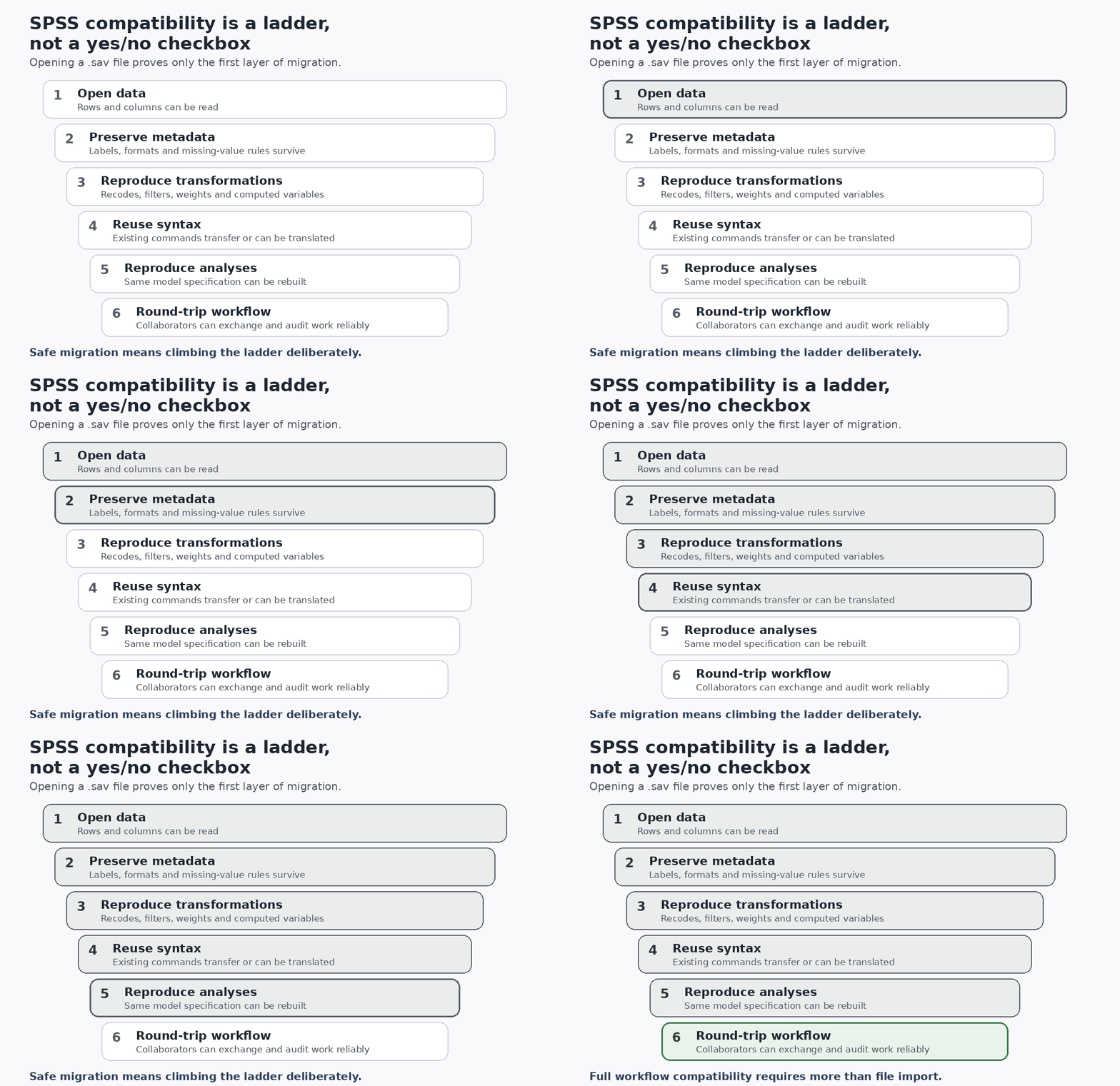
| Compatibility level | What it actually proves |
|---|---|
| Open data | Rows and columns can be read |
| Preserve metadata | Labels, formats and missing-value rules survive |
| Reproduce transformations | Recodes, filters, weights and computed variables can be rebuilt |
| Reuse syntax | Existing commands transfer, or a reliable translation path exists |
| Reproduce analyses | The same model specification and options can be reconstructed |
| Round-trip workflow | Collaborators can exchange, rerun and audit the project reliably |
PSPP is strongest when syntax and SPSS-like behavior are central. jamovi and JASP make SPSS data import straightforward. R can preserve substantial SPSS metadata through haven, but the researcher must make explicit decisions about labels and user-defined missing values. PSPP compatibility; haven SPSS semantics
File compatibility is therefore not workflow compatibility. A successful import is the beginning of validation, not the end.
How to Move a Research Project Away From SPSS Safely
The safest migration strategy is to test one representative workflow before converting an entire thesis, paper or research archive. Preserve the original SPSS project unchanged, then import a working copy into the candidate software.
Audit variable types, labels, category coding, date formats, user-defined missing values, filters, weighting and row counts. Recreate one important analysis using the same model specification, contrasts, confidence level, missing-data rules and other settings. Then compare estimates, standard errors, confidence intervals, test statistics and p-values before moving the remaining work.
If numbers differ, do not immediately assume one program is wrong. First check factor coding, missing-data behavior, sums of squares, corrections, estimators, convergence settings and numerical tolerances. The high-impact task is matching model specifications; cosmetic differences in table layout can wait.
Document the software version and, when relevant, the jamovi/JASP module or R package used. This turns migration into an auditable methodological change rather than an informal software swap.
Common Mistakes When Replacing SPSS
The first mistake is choosing the software that looks most familiar before checking the project’s hardest analytical requirement. Familiarity reduces learning cost, but it cannot compensate for a missing estimator or sampling design.
The second is treating .sav import as proof of complete compatibility. Data can transfer while transformations, syntax, output and statistical defaults do not.
The third is assuming identically named procedures must produce identical results under default settings. Software can implement valid versions of the same method with different defaults.
The fourth is ignoring collaboration. A researcher may prefer R while every coauthor, supervisor or institutional template remains tied to SPSS. That does not make R inferior; it changes the switching cost.
The fifth is optimizing only for the current paper. Researchers who repeatedly outgrow GUI packages may save time long term by moving toward R. The opposite mistake is also real: learning R immediately when a simple, time-sensitive project needs nothing beyond a reliable GUI.
Are Free SPSS Alternatives Good Enough for Published Research?
They can be. The price of statistical software is not a measure of methodological validity. The important questions are whether the chosen method is appropriate, the implementation supports the required options, assumptions and data handling are defensible, and the analysis can be reported transparently enough for readers or collaborators to understand what was done.
Researchers should report the software and version used and, where relevant, important modules or R packages. Specific journal, supervisor, institutional, regulatory or course requirements can still override a general software recommendation, so those constraints should be checked before migration rather than at submission.
A defensible principle is to choose software for methodological fit and workflow transparency, not brand recognition alone.
FAQs
What is the best free alternative to SPSS?
For many researchers who want a graphical interface and an easy transition from SPSS, jamovi is the strongest general starting point. JASP is especially compelling for Bayesian work, PSPP for SPSS-style syntax and familiarity, and R for advanced, extensible and reproducible analysis.
Are jamovi and JASP really free?
Yes. jamovi describes itself as free and open source, while JASP is an open-source project supported by the University of Amsterdam. jamovi; JASP
Can jamovi and JASP open SPSS files?
Yes. jamovi directly opens SPSS .sav files. JASP supports .sav, .zsav and .por among its imported formats. Opening the data does not automatically recreate the analyses that were previously run in SPSS. jamovi file support; JASP file formats
Can R open an SPSS .sav file?
Yes. The haven package provides read_sav() for .sav and .zsav files and write_sav() for SPSS system files. It also preserves variable labels, while user-defined missing values require deliberate handling. haven documentation
Is GNU PSPP exactly the same as SPSS?
No. PSPP is an independent GNU program, not IBM SPSS code. Compatibility with SPSS language and files is a design goal, but procedure coverage and some defaults differ. PSPP FAQ
Is R better than SPSS?
R has a higher ceiling for extensibility, automation and code-based reproducibility, but “better” depends on the workflow. SPSS or a graphical alternative can be more efficient when the required analyses are standard, the deadline is short, or collaborators depend on the existing SPSS workflow.
Which SPSS alternative is best for a thesis?
If the required analyses are conventional and time is limited, jamovi or JASP will often minimize switching friction. If the thesis depends on advanced modeling, complex survey design or a highly reproducible code pipeline, R deserves stronger consideration. Supervisor and institutional requirements should be checked before switching.
Final Recommendation: Choose by the Hardest Requirement
The best free SPSS alternatives for researchers are not interchangeable. jamovi is the strongest default for many people leaving SPSS because it combines a low-friction GUI, direct SPSS data import, an extensible module ecosystem and a practical pathway toward R.
Choose JASP when Bayesian inference and publication-oriented output are central. Choose GNU PSPP when preserving traditional SPSS-style syntax and working habits matters more than reaching the broadest range of modern methods. Choose R when you are willing to invest more learning time for the greatest analytical flexibility and reproducibility.
The most important practical step comes before any full migration: reproduce one representative analysis in the candidate software and compare it carefully with the original SPSS workflow. That test reveals more about real suitability than a generic ranking ever can.