
OpenCV 5 Features, Installation and Migration Guide
Explore OpenCV 5 features, DNN upgrades, installation steps, migration tips, performance results, and real world uses in this complete developer guide.
OpenCV 5 Object Detection: DNN Engine, YOLO26, Python Setup, and Performance
Practical guide to the new DNN engine, ONNX deployment, YOLO26 inference, benchmarks, and migration from OpenCV 4.
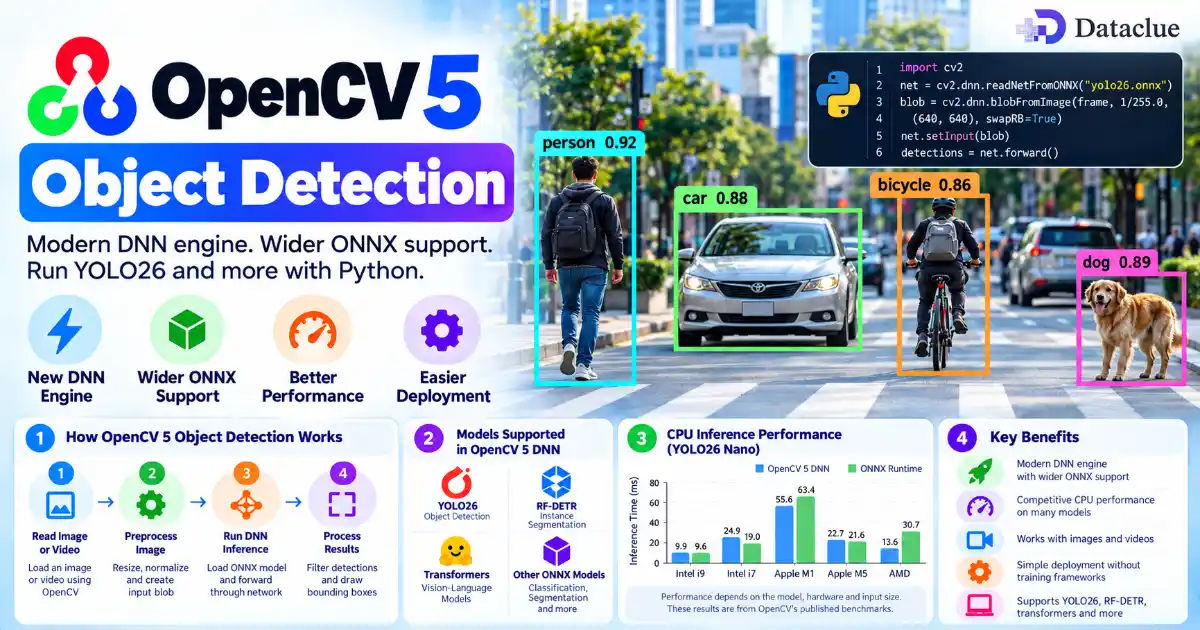
OpenCV 5 Detection Pipeline
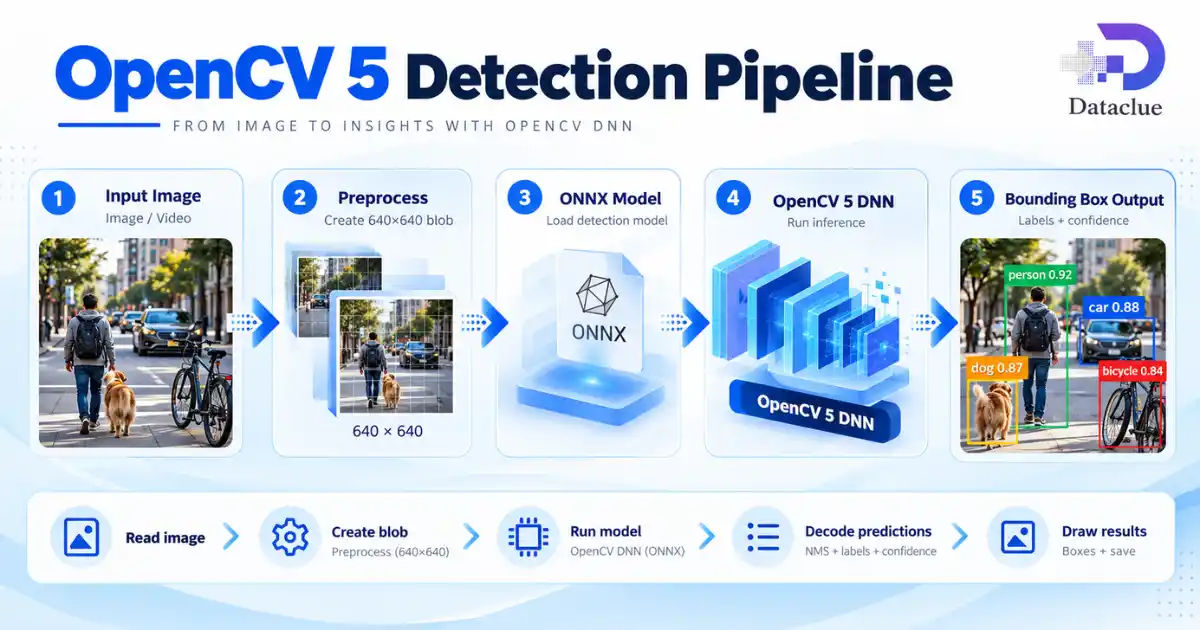
The plot highlights each stage from input and preprocessing through DNN inference and final detections.
OpenCV 5 object detection lets developers load trained deep-learning models, process images or video, identify objects, and draw detection results without keeping the original training framework inside the final application.
A YOLO model can be trained or exported in another framework, converted to ONNX, and then loaded directly into OpenCV. OpenCV handles the surrounding computer vision work, including image and video input, preprocessing, neural-network inference, result processing, drawing boxes, and saving the final output.
The biggest change for modern deep learning is the redesigned DNN module. OpenCV 5 adds a graph-based inference engine, broader ONNX support, and improvements aimed at newer detection, segmentation, transformer, and vision-language models.
Why OpenCV 5? What Is New?
OpenCV 5 is the first major OpenCV generation after the 4.x series. It introduces important changes across image processing, deep learning, hardware support, Python integration, and the core library.
- A redesigned DNN inference engine
- Wider ONNX model support
- Improved handling of dynamic shapes
- Graph optimization and memory reuse
- C++17 as the minimum C++ standard
- Removal of the old C API
- Updated image-processing functions and deep-learning samples
- Better support for modern detection, segmentation, transformer, and vision-language models
For object detection, the most important change is the new DNN engine because it makes modern exported neural networks easier to run inside OpenCV.
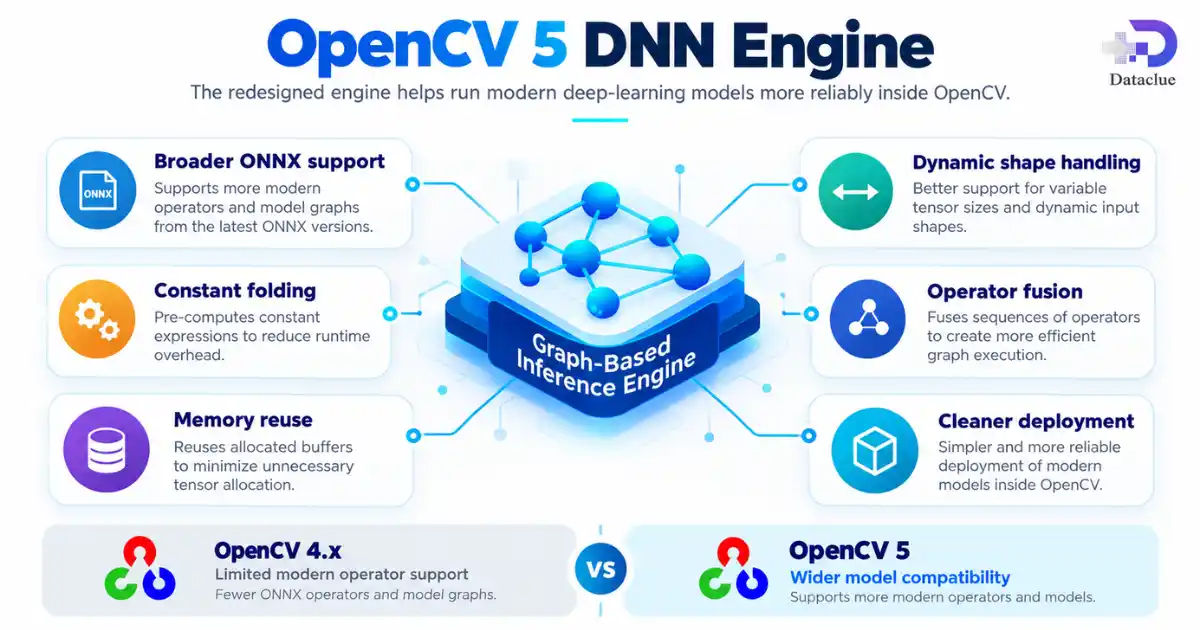
The Headline: A Brand-New DNN Engine
The DNN module is one of the largest changes in OpenCV 5. In OpenCV 4.x, developers sometimes had to modify or simplify newer ONNX models because not every operation was supported.
OpenCV 5 moves toward a graph-based inference system. Instead of treating the network only as a sequence of separate layers, the engine can reason about the model as a connected computation graph.
- Shape inference
- Constant folding
- Operator fusion
- Dynamic shape handling
- Subgraph processing
- Memory reuse
OpenCV reports much broader ONNX operator coverage in OpenCV 5 than in older releases. The practical meaning is simple: more current models have a better chance of loading and running directly without custom conversion work.
What Is the OpenCV DNN Module?
DNN stands for Deep Neural Network. The OpenCV DNN module is mainly an inference system, which means it runs models that have already been trained. It does not replace the full training workflow of PyTorch or TensorFlow.
A typical workflow looks like this: train a model, export it, load it in OpenCV, and run inference. ONNX is especially useful because it gives developers a common model format that can move between tools.
| Application | Example |
|---|---|
| Object detection | Finding people, vehicles, animals, or products |
| Instance segmentation | Identifying the pixels that belong to each detected object |
| Image classification | Assigning a label to an image |
| Pose estimation | Finding body keypoints |
| OCR pipelines | Processing text in images |
| Video analytics | Detecting objects frame by frame |
| Robotics | Finding objects in live camera feeds |
| Industrial inspection | Detecting components, defects, or missing parts |
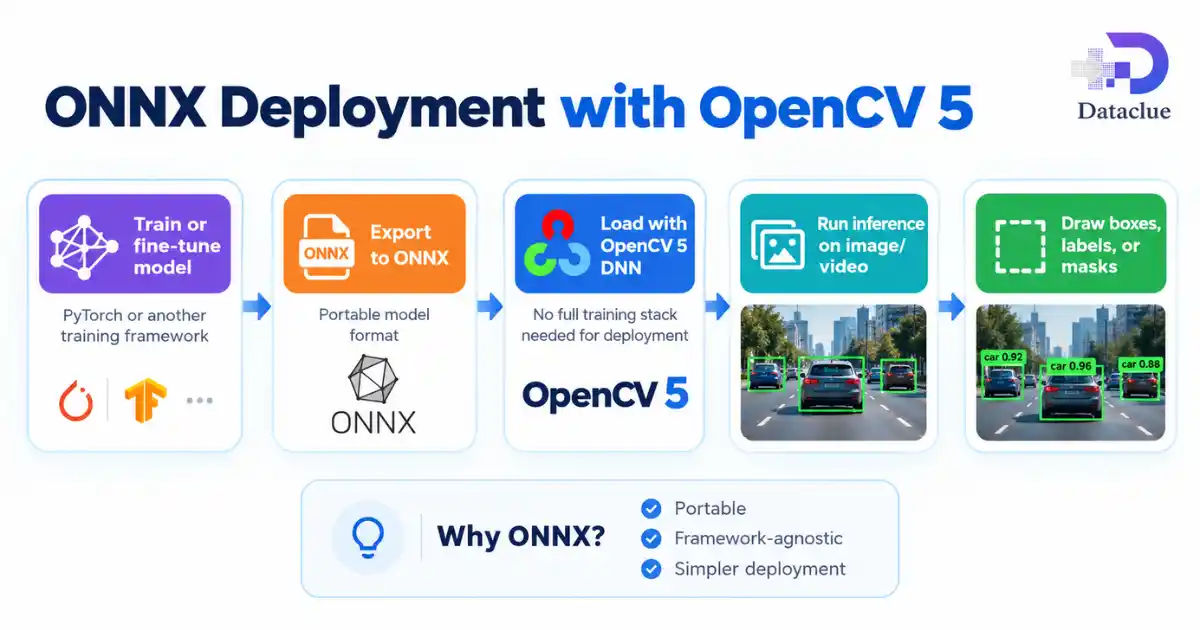
Typical deployment path from a training framework to OpenCV 5 inference.
How Object Detection Works in OpenCV 5
A typical OpenCV 5 object-detection pipeline has five main stages: read the input, prepare it for the neural network, run inference, process the predictions, and draw or save the results.
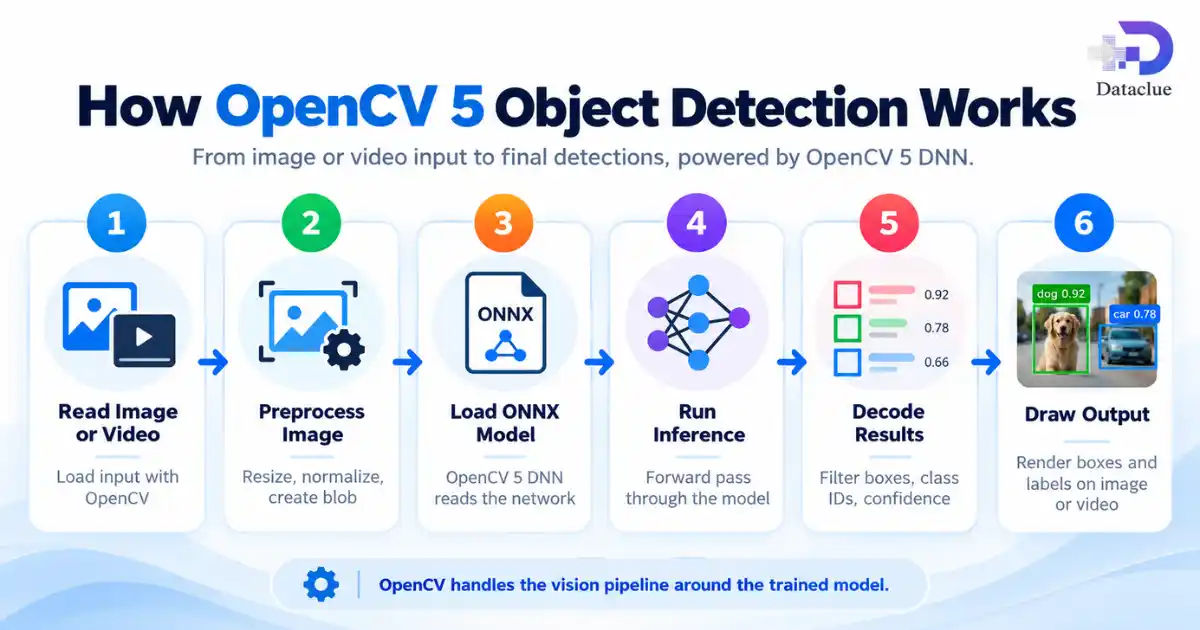
1. Read the image or video
image = cv2.imread("image.jpg")

video = cv2.VideoCapture("video.mp4")
2. Prepare the image
Neural networks normally expect images in a specific size, channel order, and numerical range. OpenCV can turn an image into a network-ready tensor with blobFromImage().
3. Load the model
net = cv2.dnn.readNetFromONNX("model.onnx")4. Run inference
net.setInput(blob)
output = net.forward()
5. Process and display results
The final stage usually includes confidence filtering, reading class IDs, converting box coordinates back to the original image, drawing bounding boxes, adding labels, and saving or displaying the result.
Install OpenCV 5
Use a separate Python environment for inference so that model-export packages do not conflict with the runtime environment.
python -m venv .venvOn Linux or macOS:
source .venv/bin/activateOn Windows PowerShell:
.venv\Scripts\Activate.ps1Install the headless package when you do not need desktop display windows:
python -m pip install opencv-python-headlessUse the standard package when your application needs OpenCV GUI functions:
python -m pip install opencv-pythonCheck the installed version with:
import cv2
print(cv2.__version__)
Why Use ONNX With OpenCV 5?
ONNX stands for Open Neural Network Exchange. It provides a common format for moving trained models between different tools. A common deployment path is PyTorch to ONNX to OpenCV.
The benefit is not only compatibility. It can also reduce production dependencies. Instead of shipping OpenCV plus a full training framework and its related packages, an application may need only OpenCV, the ONNX model, labels, and its own processing code.
Running YOLO26 With OpenCV 5
The practical examples published by OpenCV and LearnOpenCV use YOLO26 Nano. The tested model uses a fixed 640 x 640 input and produces an end-to-end detection output shaped as [1, 300, 6].
Each row contains x1, y1, x2, y2, confidence, and class ID. The end-to-end export used in the example already returns final detections, so it does not need a separate Non-Maximum Suppression step in the OpenCV inference code. This should not be assumed for every YOLO export.
| Field | Meaning |
|---|---|
| x1, y1 | Top-left corner of the predicted box |
| x2, y2 | Bottom-right corner of the predicted box |
| confidence | Detection confidence score |
| class_id | Predicted object class |
Export YOLO26 to ONNX
The model first needs to be exported. A simplified example is:
from ultralytics import YOLO

model = YOLO("yolo26n.pt")
model.export(
    format="onnx",
    imgsz=640,
    batch=1,
    dynamic=False,
    nms=False
)
Export settings can change between model-package versions, so production projects should record the exact model version, export settings, and inference environment.
Prepare the Image and Run Inference
YOLO models normally expect RGB images with pixel values scaled into a specific numerical range. The image may also need letterboxing so that it fits the model input without distorting its shape.
blob = cv2.dnn.blobFromImage(
    image,
    scalefactor=1 / 255.0,
    size=(640, 640),
    swapRB=True,
    crop=False
)

net.setInput(blob)
detections = net.forward()
After inference, detections below the chosen confidence threshold can be removed and the remaining coordinates can be mapped back to the original image size.
Object Detection on an Image
import cv2

net = cv2.dnn.readNetFromONNX("yolo26n.onnx")
image = cv2.imread("input.jpg")

blob = cv2.dnn.blobFromImage(
    image, 1 / 255.0, (640, 640),
    swapRB=True, crop=False
)

net.setInput(blob)
output = net.forward()
print(output.shape)
A real application needs additional code for resizing, letterbox correction, confidence filtering, class labels, and drawing the final boxes. The important point is that inference does not require PyTorch once the model has been exported to a compatible ONNX file.
Object Detection on Video
Video object detection uses almost the same model pipeline. The main difference is that the inference step repeats for each frame.
import cv2

cap = cv2.VideoCapture("video.mp4")

while True:
    success, frame = cap.read()
    if not success:
        break

    # preprocess frame
    # run model
    # decode detections
    # draw boxes

cap.release()
The same pattern can be used for traffic monitoring, sports analysis, CCTV systems, manufacturing cameras, retail analytics, robotics, and wildlife monitoring.
Where Exactly Is OpenCV 5 Doing the Work?
OpenCV does not teach YOLO what a person, car, ball, or dog looks like. That knowledge comes from the trained model. OpenCV runs the model and handles the computer vision pipeline around it.
| Task | OpenCV or model? |
|---|---|
| Understand what a person looks like | Trained model |
| Read an image | OpenCV |
| Decode video | OpenCV |
| Resize and normalize input | OpenCV |
| Run neural-network operations | OpenCV DNN engine |
| Produce predictions | Model running inside OpenCV |
| Filter results | Application and OpenCV |
| Draw bounding boxes | OpenCV |
| Save image or video | OpenCV |
Three Engines, One API
The original OpenCV 5.0 release introduced multiple DNN engine choices behind the same general API. This reduced migration risk because applications could keep older paths where required while testing the new engine.
| Engine | Purpose |
|---|---|
| ENGINE_AUTO | Try the preferred engine and fall back where supported |
| ENGINE_NEW | Use the rewritten OpenCV 5 engine |
| ENGINE_CLASSIC | Use the older inference path |
| ENGINE_ORT | Use ONNX Runtime when the OpenCV build includes it |
The 5.x API can evolve between releases, so production code should use named constants and check the documentation for the exact OpenCV version installed on the target system.
How Fast Is the New Engine?
Inference speed depends on the CPU, model, input resolution, thread count, OpenCV build, memory system, preprocessing, and post-processing. There is no single answer to whether OpenCV is always faster than ONNX Runtime.
Published OpenCV YOLO26 Nano CPU results show each runtime winning on different hardware. Lower latency is better.
| Hardware | OpenCV 5 DNN | ONNX Runtime |
|---|---|---|
| Intel i9 | 9.9 ms | 9.6 ms |
| Intel i7 | 24.9 ms | 19.0 ms |
| Apple M1 | 55.6 ms | 63.4 ms |
| Apple M5 | 22.7 ms | 21.6 ms |
| AMD | 13.6 ms | 30.7 ms |
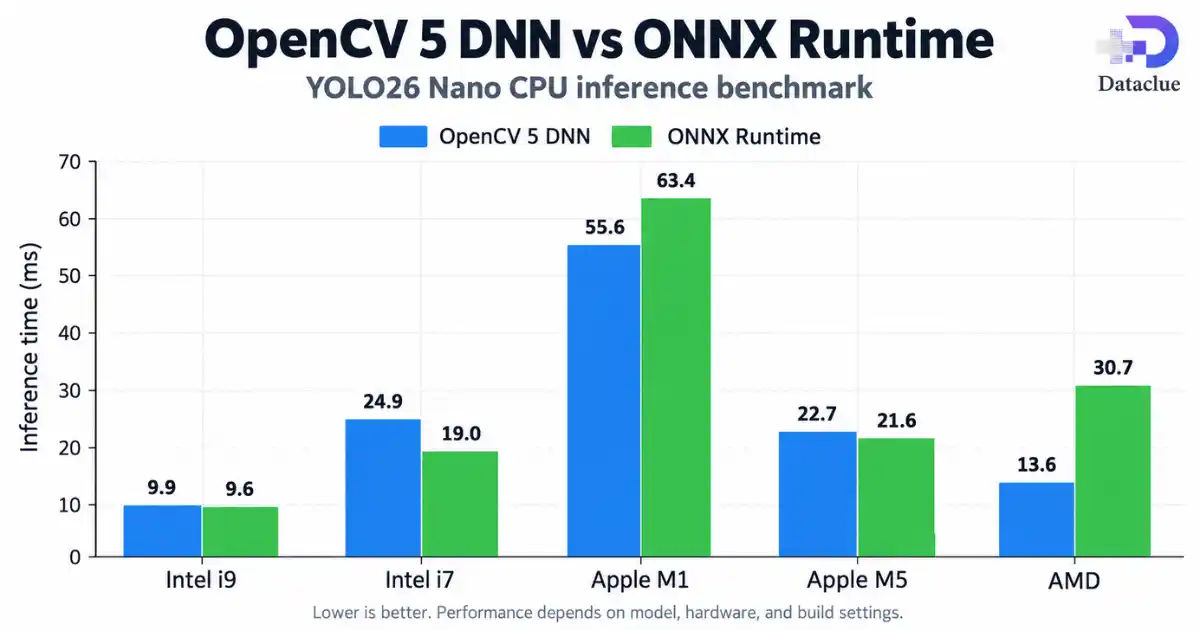
Published YOLO26 Nano CPU inference benchmark. Lower is better.
Treat benchmark tables as guidance, not a promise. The right choice is to benchmark the exact exported model on the production hardware and build configuration.
OpenCV 5 vs ONNX Runtime
| Feature | OpenCV 5 DNN | ONNX Runtime |
|---|---|---|
| ONNX inference | Yes | Yes |
| Image processing | Extensive | Limited |
| Video handling | Built in | No |
| Drawing and visualization | Built in | No |
| Computer vision algorithms | Extensive | No |
| Main purpose | Computer vision plus inference | General ONNX inference |
| Model training | No | No |
| CPU inference | Yes | Yes |
If an application already depends heavily on OpenCV for images and video, its DNN engine can simplify the deployment stack. In other applications, ONNX Runtime may still be a better fit.
Models That Run Out of the Box
Object detection is only one part of the OpenCV 5 DNN story. The project has validated models covering object detection, instance segmentation, image segmentation, feature extraction, transformers, vision-language models, and image inpainting.
This is useful because many modern computer vision systems combine several tasks. An application may detect an object, segment it, measure it, and classify it in the same pipeline.
Example 2: Instance Segmentation With RF-DETR
Object detection tells you where an object is with a bounding box. Instance segmentation goes further and identifies the visible pixels belonging to each detected object.
OpenCV DNN examples include RF-DETR Seg Nano, which can produce boxes, class predictions, confidence values, and segmentation masks. This is useful for product measurement, quality inspection, medical imaging, robotics, background removal, and scenes where objects overlap.
GPU Inference and Migration From OpenCV 4
CPU support is currently one of the strongest parts of the redesigned OpenCV 5 DNN path. GPU behavior needs more care because support and engine selection can depend on the exact build and release. Do not assume that choosing a CUDA target automatically moves every new-engine model to the GPU.
Migration from OpenCV 4 can also involve broader API changes. OpenCV 5 removes the old C API, requires C++17 for C++ development, and moves or removes some older modules and import paths.
What Happened to Darknet and Caffe?
OpenCV 5 shifts the DNN workflow toward ONNX. Older direct import paths such as Darknet and Caffe parsers are no longer the main future-facing deployment route.
For older projects, a more sustainable migration path is to convert the original model to ONNX, validate its outputs, and load the ONNX model with OpenCV 5.
Original model
      |
      v
Export or convert to ONNX
      |
      v
Load ONNX in OpenCV 5
OpenCV 5 Object Detection Best Practices
- Keep model export and inference environments separate.
- Pin model and package versions so the export is reproducible.
- Record input size, normalization, color order, and letterbox rules.
- Tune confidence thresholds using your own data.
- Benchmark on production hardware instead of relying only on published numbers.
- Check DNN engine behavior for the exact OpenCV 5.x release you deploy.
- Validate OpenCV outputs against the original model before shipping.
OpenCV 5 Object Detection Use Cases
| Use case | How OpenCV 5 helps |
|---|---|
| Security and surveillance | Detect people, vehicles, packages, or restricted-area activity |
| Manufacturing | Find defects, missing parts, or assembly errors |
| Sports analytics | Detect players, balls, and equipment |
| Retail | Count visitors or analyze shelf products |
| Robotics | Locate objects from live camera feeds |
| Traffic monitoring | Detect cars, buses, bicycles, and pedestrians |
| Agriculture | Identify crops, fruit, animals, or weeds |
| Video search | Scan frames for specific object classes |
Advantages of OpenCV 5 for Object Detection
- Simple deployment with ONNX models
- One library for image I/O, video, preprocessing, inference, drawing, and saving
- Broader ONNX compatibility than older OpenCV generations
- Competitive CPU inference on several published hardware tests
- Python and C++ support for prototyping and production
Limitations of OpenCV 5 Object Detection
OpenCV is mainly an inference and computer vision library, not a complete deep-learning training system. Training, fine-tuning, distributed learning, gradient computation, and large dataset management normally stay in a dedicated framework.
Model compatibility also depends on the export. Even with better ONNX support, the exact model should be tested before the inference stack is finalized. GPU-heavy deployments need additional validation because backend support can differ by build and release.
Frequently Asked Questions About OpenCV 5 Object Detection
Can OpenCV 5 run YOLO models?
Yes. Modern YOLO models can be exported to ONNX and run through the OpenCV DNN module. The OpenCV and LearnOpenCV examples demonstrate YOLO26 inference.
Does OpenCV 5 require PyTorch for inference?
Not necessarily. After a compatible model is exported to ONNX, OpenCV can load and run it without PyTorch in the inference environment.
Can OpenCV 5 run object detection on CPU?
Yes. CPU inference is a major use case for the redesigned DNN engine, and OpenCV publishes CPU benchmarks for modern models.
Does OpenCV 5 support video object detection?
Yes. VideoCapture can read frames, DNN can run inference, and OpenCV can draw and write the results.
Is OpenCV 5 faster than ONNX Runtime?
Sometimes. Published results show OpenCV ahead on some model and hardware combinations and ONNX Runtime ahead on others. Benchmark your own workload.
Does OpenCV train YOLO models?
No. OpenCV DNN is mainly for inference. Training and fine-tuning are usually done in a dedicated deep-learning framework.
Why use ONNX with OpenCV?
ONNX makes it easier to move a trained model from its training framework into a lightweight OpenCV inference application.
Is Non-Maximum Suppression required for YOLO26?
The specific end-to-end YOLO26 export used in the referenced examples returns final detections and does not need a separate NMS step. Other model exports may still require it.
Can OpenCV 5 run segmentation models?
Yes. OpenCV DNN examples include instance segmentation with RF-DETR as well as object detection.
Should I upgrade from OpenCV 4 to OpenCV 5?
New projects that need modern ONNX inference can benefit from OpenCV 5. Existing applications should first check removed APIs, moved modules, model-import changes, C++ requirements, and backend behavior.
Final Thoughts
OpenCV 5 is an important update for developers building real-world computer vision applications. The biggest improvement for object detection is not a new detection model created by OpenCV. It is the new DNN inference architecture that makes modern trained models easier to run inside OpenCV.
YOLO26 provides the learned detection ability. OpenCV 5 provides the engine and computer vision tools that turn the trained model into a practical application.
The workflow is straightforward: train or download a model, export it to ONNX, load it with OpenCV, preprocess the image, run inference, decode predictions, and draw the result.
With stronger ONNX support, competitive CPU performance, simpler deployment, and support for tasks beyond detection, OpenCV 5 is a more capable self-contained computer vision inference platform than previous OpenCV generations.
Sources
LearnOpenCV - How to Run Object Detection with OpenCV 5: https://learnopencv.com/how-to-run-object-detection-with-opencv-5/
OpenCV - OpenCV 5 Progress Update: https://opencv.org/opencv-5-progress-update-may-9-2024/
OpenCV - DNN Module: https://opencv.org/opencv-dnn-module/
OpenCV GitHub Wiki - OpenCV 5: http://github.com/opencv/opencv/wiki/OpenCV-5
OpenCV - OpenCV 5: https://opencv.org/opencv-5/