
OpenCV 5 Features, Installation and Migration Guide
Explore OpenCV 5 features, DNN upgrades, installation steps, migration tips, performance results, and real world uses in this complete developer guide.
OpenCV 5 Features, DNN, Installation, Performance, and Migration A complete search optimized guide for developers, researchers, and technical teams |
|---|
Updated July 18, 2026
Contents
- Introduction
- What Is OpenCV 5?
- Why OpenCV 5 Is a Major Milestone
- Key OpenCV 5 Features
- OpenCV 5 Compared With OpenCV 4
- Performance Improvements and Benchmark Results
- New AI and Deep Learning Capabilities
- OpenCV 4 to OpenCV 5 Migration Guide
- How to Install OpenCV 5
- Practical Applications of OpenCV 5
- Advantages and Limitations
- Best Practices for OpenCV 5 Projects
- The Future of OpenCV
- Frequently Asked Questions
- Conclusion
- SEO Publishing Pack
Introduction
Computer vision is moving quickly. A few years ago, many projects focused on resizing images, finding edges, tracking simple objects, or detecting faces with older methods. Today, developers work with object detection, image segmentation, vision language models, depth estimation, robotics, and large camera systems.
This growth placed pressure on OpenCV. The library remained useful, but some parts of its design came from an earlier time. Old interfaces, broad modules, older model loaders, and years of technical debt made future work harder.
OpenCV 5 responds to that problem. The stable OpenCV 5.0.0 release arrived on June 6, 2026. It keeps the practical strengths of OpenCV while removing outdated parts and creating a better base for modern computer vision and artificial intelligence. Official Python wheels followed in July 2026, with opencv-python 5.0.0.93 listed on PyPI as of this article update. [1][5]
| Key takeaway OpenCV 5 is a careful reset. It brings a modern C++ base, stronger ONNX support, clearer modules, better camera and 3D tools, and a new direction for deep learning inference. |
|---|
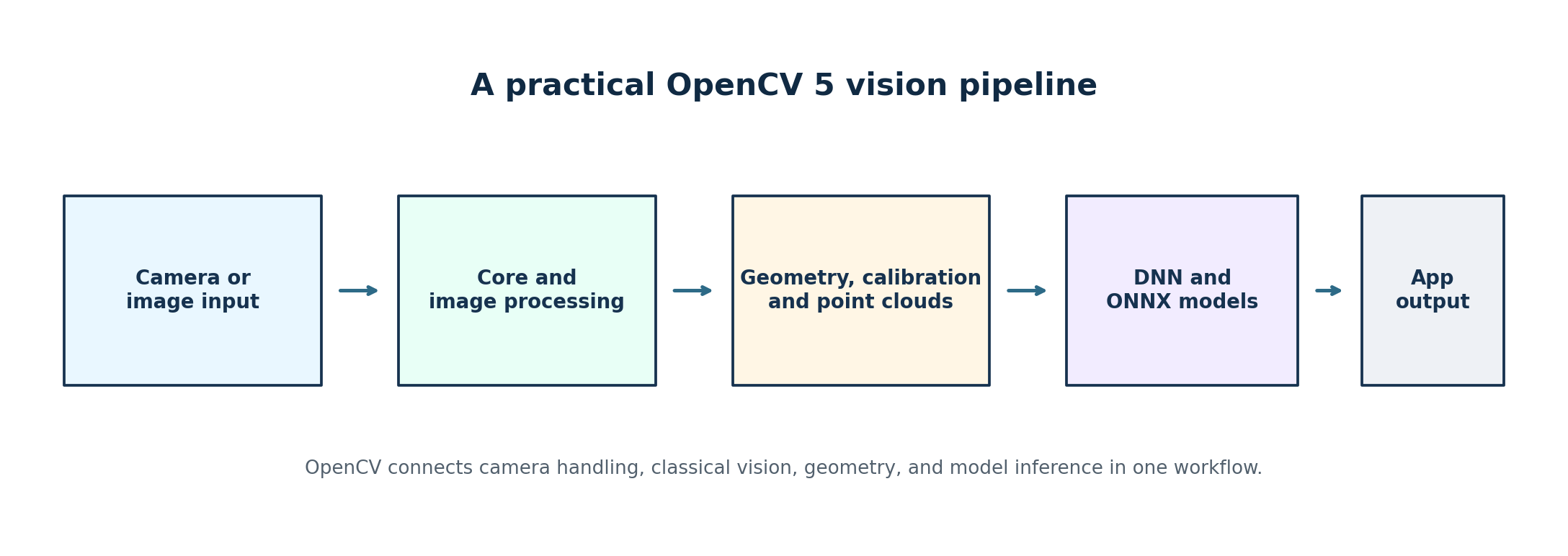
Figure 1. A practical OpenCV 5 vision pipeline.
• • •
What Is OpenCV 5?
OpenCV 5 is a major generation of the Open Source Computer Vision Library. It gives developers ready made tools for images, video, cameras, geometry, feature matching, calibration, depth, neural network inference, and many other visual tasks.
The library is used because computer vision systems rarely perform only one action. A factory inspection tool may need to read a camera frame, correct lens distortion, improve contrast, locate a product, run a defect model, draw the result, and save evidence. OpenCV can support most of that workflow in one project.
- Read and write common image and video formats.
- Capture frames from cameras and video streams.
- Resize, filter, transform, and measure images.
- Detect contours, corners, keypoints, and visual features.
- Calibrate cameras and estimate 3D relationships.
- Run many neural network models exported to ONNX.
- Build tools for robotics, machine vision, research, and education.
OpenCV 5 is important because it prepares the project for current workloads instead of preserving every old design choice. The team removed the legacy C interface, split large modules into clearer parts, expanded core data types, revised the DNN engine, and improved support for point clouds, text, calibration, and modern ONNX graphs. [2][3]
• • •
Why OpenCV 5 Is a Major Milestone
A modern C++ foundation
OpenCV 5 requires C++17 or later. This gives maintainers a cleaner language base and lets them use modern features without carrying support for very old compiler environments. The migration guide lists GCC 8, Clang 9, and MSVC 2017 as practical minimum levels. Python 2 support has ended, so Python projects must use Python 3. [3]
Less technical debt
The old C interface is gone. Structures such as CvMat and IplImage are no longer part of the main path. OpenVX support has also been removed. The Graph API and classic machine learning modules now live in opencv_contrib. This makes the main repository more focused, but it also means older projects need a careful audit. [2][3]
Clearer module ownership
The former calib3d module covered several different areas. OpenCV 5 separates this work into geometry, calib, stereo, and ptcloud. The features2d module is now called features. The split helps developers understand where a function belongs and gives each area more room to grow. [2]
A stronger AI direction
The DNN module received the largest redesign. The new engine improves dynamic shape handling, ONNX subgraphs, shape inference, attention components, tokenizers, and model decoding. OpenCV reports support for more than 80 percent of the ONNX specification, compared with less than 23 percent in the older engine. [2]
• • •
Key OpenCV 5 Features
1. C++17 is now required
New C++ projects must compile with C++17 or later. This improves the base for future work, but old build servers, embedded toolchains, and vendor SDKs may need updates before migration.
2. The legacy C API has been removed
Modern cv::Mat based C++ code is the preferred path. Applications that still use CvMat, IplImage, cvCreateMat, or other old C style functions will need real code changes. Familiar depth constants such as CV_8U and CV_32F still remain.
3. The module structure is cleaner
The calibration and 3D area is now separated into geometry, calib, stereo, and ptcloud. New code should include the focused header it needs. This can reduce confusion in large projects.
4. Core data types have expanded
OpenCV 5 adds bfloat16, unsigned 32 bit and 64 bit integers, signed 64 bit integers, and Boolean values. These types improve support for large data, masks, and modern neural network tensors.
5. Arrays can be truly one dimensional
Vectors wrapped in cv::Mat can now behave as one dimensional arrays instead of always looking like N by 1 or 1 by N matrices. This is cleaner, but code that relies on rows and columns should be reviewed. Use total() when you need the element count.
6. MatShape replaces MatSize
MatShape is the preferred name for shape and layout information. MatSize remains as an alias for source compatibility. The change fits better with modern multi dimensional tensors.
7. A new DNN inference engine is available
The new engine handles dynamic shapes, subgraphs, attention related blocks, tokenizers, and more ONNX operations. OpenCV can use the new engine first and fall back to the classic engine when automatic selection is enabled.
8. ONNX Runtime can be integrated
Developers can build OpenCV with ONNX Runtime support. This offers another execution path when a model contains an operation that the new native engine does not yet handle, or when a supported execution provider is needed.
9. Modern feature matching has improved
The features module keeps methods such as SIFT, ORB, FAST, and MSER. It also adds newer learned features such as ALIKED and DISK, along with LightGlue matching. Annoy based nearest neighbor search is available as a modern choice.
10. Contour extraction can be faster
OpenCV 5 includes the TRUCO contour method. OpenCV can select it through findContours when the input and settings fit the method. The official overview reports strong speed gains in suitable cases.
11. Image warping is more accurate
warpAffine, warpPerspective, and remap now use revised interpolation methods. Bilinear and bicubic output is closer to the exact mathematical result. This can improve quality, but strict pixel tests may need new reference images.
12. Resize behavior is more consistent
Nearest neighbor resize now follows rounding behavior that matches Pillow more closely. INTER_NEAREST and INTER_NEAREST_EXACT now behave the same way. Some boundary pixels can differ from OpenCV 4.
13. Text rendering is more useful
A new TrueType renderer based on STB supports custom fonts, UTF 8 strings, and much wider Unicode coverage. Complex text shaping for scripts such as Arabic is still limited, so international applications should test the exact language they need.
14. Multi camera calibration is stronger
The new calibration pipeline can work with pinhole and fisheye cameras, mixed camera rigs, checkerboards, ChArUco targets, circle grids, and partial target views. This is useful in robotics, sports analysis, surround view systems, and industrial inspection.
15. Point cloud and mesh work has started
The ptcloud direction includes early support for Iterative Closest Point, Truncated Signed Distance Function processing, PLY and OBJ files, and visual odometry related workflows. This area is still expected to grow during the OpenCV 5 series.
16. Samples and documentation are more modern
Outdated or repeated samples were removed, while newer examples cover areas such as vision language models and latent diffusion. The documentation design is also cleaner and more responsive.
| Important limit The new native OpenCV 5 DNN engine currently focuses on CPU execution. GPU inference can still use the classic engine or a suitable ONNX Runtime build. Native GPU support for the new engine is planned for future 5.x work, so production plans should use the features available today. |
|---|
• • •
OpenCV 5 Compared With OpenCV 4
OpenCV 5 is not simply OpenCV 4 with extra functions. It changes the project structure and removes older paths. The table below shows the most important differences for developers.
| Area | OpenCV 4 | OpenCV 5 |
|---|---|---|
| C++ standard | Older standards supported | C++17 or newer required |
| Python | Older history included Python 2 | Python 3 only |
| Legacy C API | Still available in older code | Removed |
| DNN engine | Classic engine | New engine plus classic fallback |
| ONNX support | Limited modern graph coverage | Wider coverage with dynamic shapes and subgraphs |
| Model formats | Caffe and Darknet loaders available | ONNX is the main recommended format |
| Feature module | features2d | features |
| Calibration | Large calib3d module | geometry, calib, stereo, and ptcloud |
| Text drawing | Hershey fonts | TrueType support and wider Unicode |
| Array shape | Vectors often appear as 2D matrices | True 1D and scalar arrays |
| Classic ML and Graph API | In main repository | Moved to opencv_contrib |
| Future feature work | Maintenance and shared fixes continue | Most major new work targets 5.x |
Most modern Python projects should need only small changes. Older C++ applications, custom extensions, legacy model loaders, and strict image comparison systems may need more work. [3]
• • •
Performance Improvements and Benchmark Results
Performance claims need context. A computer vision library is not faster for every model, processor, image size, operating system, and build. The best test is always the target application on the target hardware.
OpenCV published CPU inference benchmarks for the new OpenCV 5 DNN engine against ONNX Runtime 1.25.1. The results show a mixed but competitive picture. OpenCV is faster on some models, while ONNX Runtime is faster on others. [4]
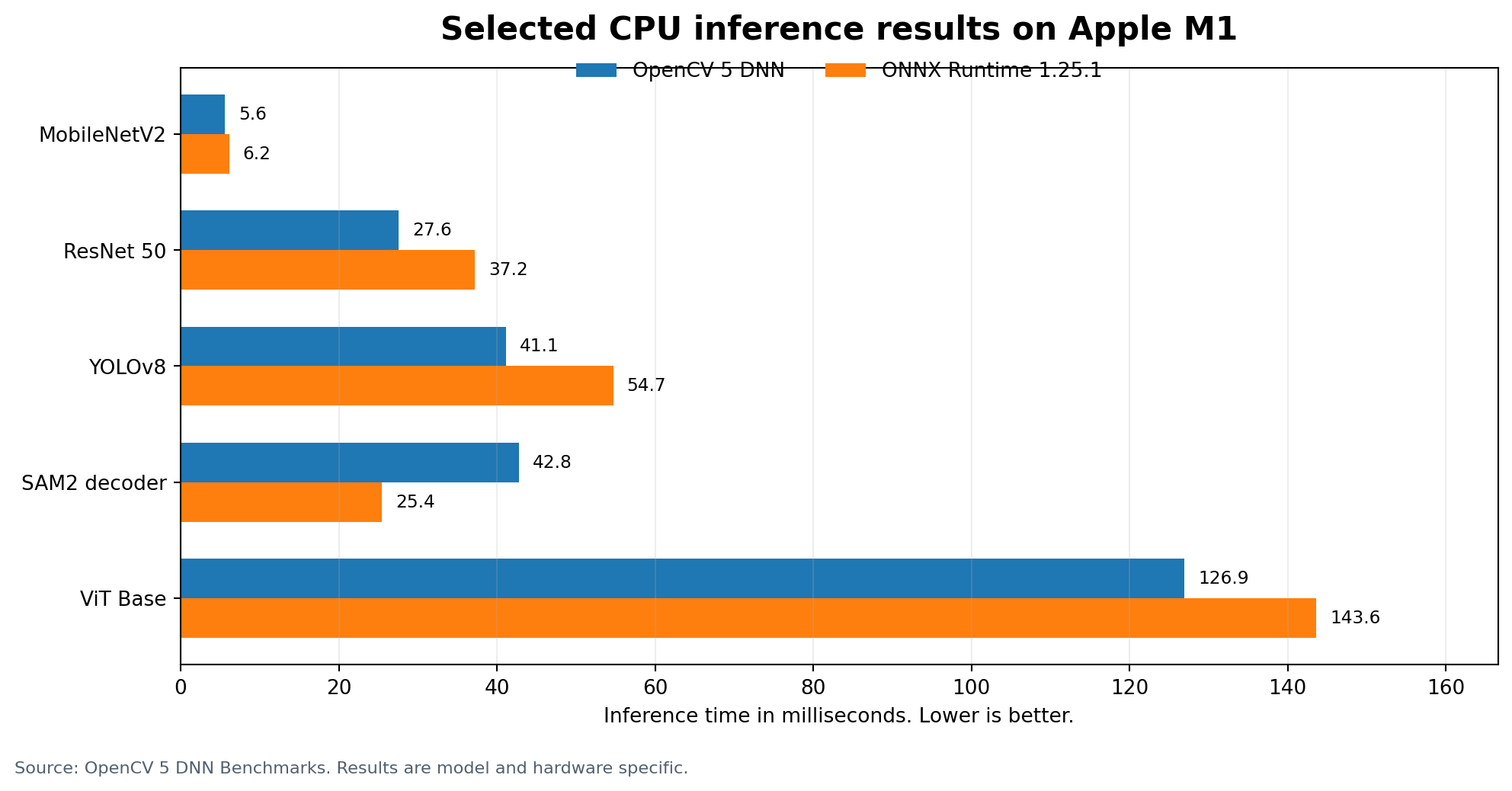
Figure 2. Selected Apple M1 CPU inference results. Lower values are better.
In this selected Apple M1 group, OpenCV 5 is faster for MobileNetV2, ResNet 50, YOLOv8, and ViT Base. ONNX Runtime is faster for the SAM2 decoder. The chart is not a universal ranking. It shows why model by model testing matters.
Other speed related changes
- TRUCO can speed up contour extraction for suitable images and settings.
- Revised interpolation improves the accuracy of affine, perspective, and remap operations.
- OpenCV 4 and OpenCV 5 still share many low level CPU and SIMD improvements.
- The cleaner DNN structure is designed to support future optimization work.
| Benchmark rule Measure image loading, preprocessing, inference, output decoding, drawing, and file writing separately. A fast neural network cannot fix a slow video or image pipeline. |
|---|
• • •
New AI and Deep Learning Capabilities
ONNX is the main model format
ONNX is now the main exchange format for OpenCV DNN projects. Developers can train a model in a framework such as PyTorch, export it to ONNX, and use OpenCV for preprocessing, inference, and post processing.
Direct Caffe and Darknet model loaders were removed. Existing models in those formats should be converted to ONNX and tested carefully. The export process must preserve the expected input size, color order, scaling, output layout, and decoding logic. [3]
Vision language model building blocks
A vision language model can study an image and produce text about it. It may describe a scene, answer a question about a photo, or create searchable image summaries. OpenCV 5 includes experimental components for tokenization, attention, decoding, post processing, and key value caching. [2]
Diffusion model samples
OpenCV 5 also contains experimental latent diffusion examples. This does not make OpenCV a replacement for full generative AI frameworks. It shows that the DNN system can now handle more complex graph patterns.
CPU, GPU, and ONNX Runtime choices
The new native engine is CPU focused today. GPU projects can use the classic OpenCV engine where supported, connect OpenCV to ONNX Runtime with a suitable execution provider, or use a separate inference platform while keeping OpenCV for camera and image processing work.
| Practical advice Choose an inference path after testing the exact model. Compatibility, memory use, latency, package size, and hardware support can matter more than a small benchmark win. |
|---|
• • •
OpenCV 4 to OpenCV 5 Migration Guide
A successful migration is not complete when the project builds. It is complete when the output, accuracy, speed, and deployment behavior remain acceptable.
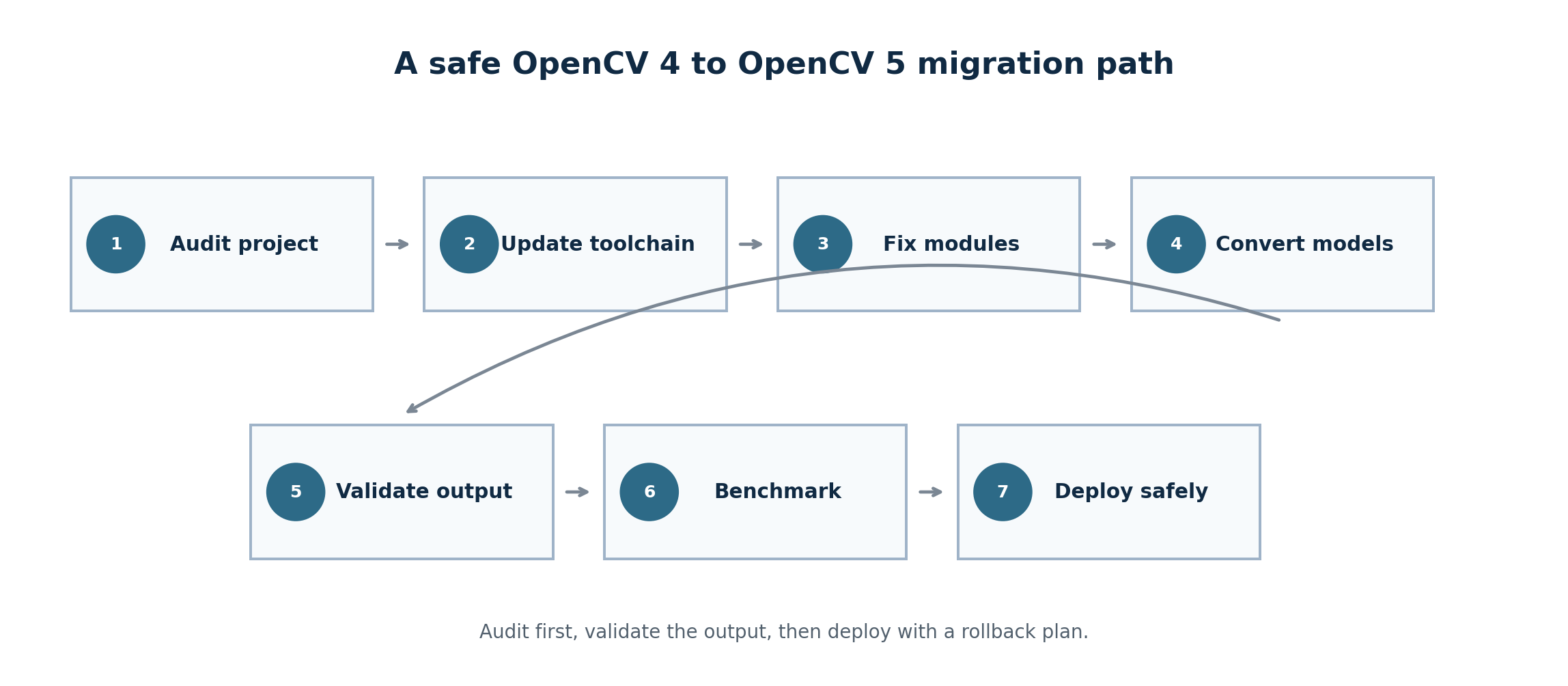
Figure 3. A safe OpenCV 4 to OpenCV 5 migration path.
Who should upgrade
- Teams starting a new computer vision project.
- Developers who need stronger ONNX support and dynamic tensor shapes.
- Projects that need modern camera calibration or early point cloud tools.
- Applications that need better Unicode text drawing.
- Teams that want future functionality from the OpenCV 5 branch.
Who may stay on OpenCV 4 for now
- Stable production systems with no clear need for new features.
- Projects tied to a vendor SDK that only supports OpenCV 4.
- Applications that still depend on the legacy C API.
- Systems that rely on removed model parsers or moved modules.
- Build environments that cannot yet support C++17.
Step 1: Update the compiler
Set the C++ language standard to C++17 and test every build environment, including CI servers and embedded devices.
| set(CMAKE_CXX_STANDARD 17) set(CMAKE_CXX_STANDARD_REQUIRED ON) |
|---|
Step 2: Find legacy C code
Search for symbols such as CvMat, IplImage, cvCreateMat, cvFindContours, and cvReleaseImage. Replace them with modern cv::Mat based code.
Step 3: Review module includes
C++ code may need to replace features2d includes with features. New projects should include the focused geometry, calib, and stereo headers instead of depending on the broad compatibility header.
| #include <opencv2/features.hpp> #include <opencv2/geometry.hpp> #include <opencv2/calib.hpp> #include <opencv2/stereo.hpp> |
|---|
Step 4: Add contrib only when needed
Classic ML, Graph API, and several moved algorithms now require opencv_contrib. Python users should install one package only because all OpenCV wheel choices share the cv2 namespace.
| python -m pip install opencv-contrib-python |
|---|
Step 5: Convert older model formats
Caffe and Darknet models should be exported or converted to ONNX. Retest model accuracy and preprocessing after conversion.
| net = cv2.dnn.readNetFromONNX("model.onnx") |
|---|
Step 6: Test array shapes
Code that expects vector data to have N rows can break because vectors can now be one dimensional. Use total() when you want the number of elements.
| size_t count = matrix.total(); |
|---|
Step 7: Update image baselines
Review tests for nearest neighbor resize, affine warping, perspective warping, remapping, text drawing, and contours. The APIs can stay the same while exact pixels change.
Step 8: Review VideoCapture checks
Unsupported video properties now return a negative value. A value of zero may be valid, so check for less than zero.
| value = capture.get(cv2.CAP_PROP_AUTOFOCUS) if value < 0: print("This property is not supported") |
|---|
Migration checklist
- Confirm C++17 support on every target.
- Remove Python 2 environments.
- Replace legacy C interfaces.
- Update module includes and package choices.
- Convert Caffe and Darknet models to ONNX.
- Check vector and scalar shape assumptions.
- Retest image, video, calibration, and DNN output.
- Benchmark speed and memory on target hardware.
- Pin the tested package version in production.
- Keep a rollback path during deployment.
• • •
How to Install OpenCV 5
Install for Python
Start with a clean virtual environment. This reduces conflicts and makes the version easy to reproduce.
| python -m venv opencv5-env |
|---|
Activate the environment on Windows:
| opencv5-env\Scripts\activate |
|---|
Activate it on Linux or macOS:
| source opencv5-env/bin/activate |
|---|
Update pip and install the main desktop package:
| python -m pip install --upgrade pip python -m pip install opencv-python |
|---|
Check the installed version:
| import cv2 print(cv2.__version__) |
|---|
As of July 18, 2026, PyPI lists opencv-python 5.0.0.93. The published wheels are CPU only. A custom source build is required for CUDA and other special options. [5]
Choose the correct Python package
| Need | Package |
|---|---|
| Main modules with desktop windows | opencv-python |
| Main and contrib modules | opencv-contrib-python |
| Main modules for servers | opencv-python-headless |
| Main and contrib modules for servers | opencv-contrib-python-headless |
| Avoid package conflicts Install only one OpenCV Python wheel in the same environment. All four packages provide the same cv2 import name. |
|---|
Build from source
A source build is useful when you need CUDA, ONNX Runtime options, contrib modules, custom codecs, a smaller binary, or hardware specific optimization.
| git clone --branch 5.0.0 https://github.com/opencv/opencv.git cd opencv cmake -S . -B build \ -DCMAKE_BUILD_TYPE=Release \ -DCMAKE_INSTALL_PREFIX=/usr/local cmake --build build --config Release --parallel cmake --install build |
|---|
Build with contrib modules
| git clone --branch 5.0.0 https://github.com/opencv/opencv_contrib.git cmake -S opencv -B build \ -DCMAKE_BUILD_TYPE=Release \ -DOPENCV_EXTRA_MODULES_PATH=opencv_contrib/modules |
|---|
Use matching OpenCV and opencv_contrib versions. Mixing branches can cause build or runtime problems.
Build with ONNX Runtime
| -DWITH_ONNXRUNTIME=ON -DDOWNLOAD_ONNXRUNTIME=ON |
|---|
OpenCV also documents an ONNX Runtime GPU download option for supported builds. Review the exact release documentation before using it in production. [2]
• • •
Practical Applications of OpenCV 5
OpenCV 5 can support many industries because it combines classical image processing, camera handling, geometry, and model inference.
Manufacturing
Defect detection, measurement, barcode reading, part alignment, robot guidance, and quality inspection.
Healthcare and research
Image registration, microscope analysis, measurement tools, motion studies, and medical device interfaces. Clinical use still requires proper validation and regulatory review.
Robotics
Camera calibration, depth, feature matching, object detection, mapping, tracking, and visual positioning.
Autonomous machines
Lane analysis, obstacle detection, camera correction, tracking, and scene understanding for drones, farm machines, and warehouse vehicles.
Retail
Shelf monitoring, product counting, queue measurement, checkout assistance, and inventory analysis. Privacy rules apply when people are recorded.
Agriculture
Crop monitoring, fruit counting, weed detection, plant health analysis, livestock tracking, and machine guidance.
Security
Motion detection, event analysis, tracking, and camera calibration. Face recognition requires careful work on consent, bias, privacy, and local law.
Smart cities
Traffic counts, parking analysis, public transport studies, road inspection, and waste monitoring.
Augmented reality
Pose estimation, accurate geometry, feature matching, calibration, and image warping.
Education
A practical way to learn classical image processing and modern model inference without building every low level tool from the beginning.
• • •
Advantages and Limitations
Main advantages
- Modern C++17 foundation.
- Wider ONNX coverage and better dynamic shape support.
- Competitive CPU inference on many tested models.
- Cleaner module structure.
- Improved multi camera calibration.
- Early point cloud and mesh tools.
- Better Unicode and TrueType text drawing.
- Python and C++ support across major desktop platforms.
- Apache License 2.0 for the main library. [6]
Important limitations
- The new DNN engine is CPU focused today.
- Some older features moved to opencv_contrib.
- Caffe and Darknet loaders were removed.
- Resize, warping, contours, and text can produce different pixels.
- Complex script shaping is still limited in the new text renderer.
- No single inference engine wins on every model and processor.
| Legal note OpenCV is open source, but a complete product may include models, datasets, codecs, images, and other libraries with separate licenses. Review those items before commercial distribution. This article is general information, not legal advice. |
|---|
• • •
Best Practices for OpenCV 5 Projects
Pin the production version
A production system should not install any future release automatically. Use a tested version and update it through a planned review.
| python -m pip install opencv-python==5.0.0.93 |
|---|
Use clean environments
Keep one OpenCV Python package in each environment. Record Python, OpenCV, compiler, operating system, and model versions.
Prefer ONNX for new DNN projects
Document the model export process, input size, color order, normalization, dynamic dimensions, output names, and post processing steps.
Benchmark the complete pipeline
1. Image or video decoding.
2. Resize and color conversion.
3. Tensor creation.
4. Model inference.
5. Output decoding.
6. Drawing and annotation.
7. File, stream, or database output.
Test numerical changes
Compare detection results, calibration errors, pixel output, memory use, video behavior, and processing time. A build that runs without errors can still change the result.
Match main and contrib releases
When building from source, use the same release tag for OpenCV and opencv_contrib.
Protect copyright and licensing
- Write original explanations instead of rewriting official pages.
- Cite technical claims and benchmark data.
- Use original, public domain, or properly licensed images.
- Check model, dataset, font, and codec licenses.
- Do not claim an official OpenCV partnership unless one exists.
- Keep required copyright and license notices in distributed software.
• • •
The Future of OpenCV
OpenCV 5.0 creates a base for the rest of the 5.x series. The official overview points toward more GPU work for the new DNN engine, wider ONNX coverage, better vision language model workflows, more point cloud algorithms, stronger hardware acceleration paths, and improved 3D vision tools. [2]
The library is likely to remain most useful as a bridge. A real vision application needs camera access, preprocessing, geometry, neural network inference, tracking, drawing, measurement, and output handling. OpenCV can connect those parts without forcing a team to build every layer alone.
• • •
Frequently Asked Questions
1. Is OpenCV 5 officially released?
Yes. OpenCV 5.0.0 was released as a stable version on June 6, 2026. [1]
2. What is the latest OpenCV Python version?
As of July 18, 2026, PyPI lists opencv-python 5.0.0.93, released on July 2, 2026. [5]
3. Is OpenCV 5 better than OpenCV 4?
OpenCV 5 is better for new work that needs modern ONNX support, cleaner modules, C++17, improved calibration, and future 5.x features. OpenCV 4 can still be a good choice for a stable system that depends on older code.
4. Does OpenCV 5 support Python?
Yes. It supports Python 3. Python 2 support has ended.
5. Does OpenCV 5 require C++17?
Yes. C++17 or later is required for C++ builds. [3]
6. Can OpenCV 5 run ONNX models?
Yes. ONNX is the main recommended model format for the revised DNN module.
7. Can OpenCV 5 load Caffe models directly?
No. The direct Caffe loader was removed. Convert the model to ONNX and test the result.
8. Can OpenCV 5 load Darknet YOLO models directly?
No. Export or convert the model to ONNX before loading it with the current recommended path.
9. Does OpenCV 5 support CUDA?
OpenCV still contains GPU related features, but standard Python wheels are CPU only and the new native DNN engine is CPU focused. CUDA work usually needs a custom build or another supported inference path.
10. Is OpenCV 5 faster than ONNX Runtime?
It is faster for some tested models and processors, while ONNX Runtime is faster for others. Test the exact model and hardware used by the application. [4]
11. Do Python imports change in OpenCV 5?
Most users still import cv2. Some algorithms now require the contrib package, but the import name remains cv2.
12. Should every OpenCV 4 project upgrade now?
No. Stable production systems should upgrade only after compatibility, accuracy, speed, and deployment tests.
13. Is OpenCV 5 free for commercial use?
The main OpenCV library uses the Apache License 2.0. Commercial use is generally possible under its terms, but products must also review third party dependencies, models, datasets, codecs, fonts, and media. [6]
14. Does OpenCV 5 support vision language models?
It includes experimental building blocks and samples for vision language model workflows through the revised DNN area.
15. How do I check my installed OpenCV version?
Run import cv2 and then print cv2.__version__ in Python.
• • •
Conclusion
OpenCV 5 is one of the most important updates in the history of the library. It removes old code, requires a modern C++ standard, improves ONNX support, introduces a new DNN engine, reorganizes major modules, strengthens camera calibration, adds early point cloud tools, and improves image processing and text drawing.
The upgrade should be simple for many modern Python projects. Older C++ applications, legacy model pipelines, and systems with strict image baselines need more careful work.
For a new computer vision project, OpenCV 5 is the logical starting point. For an existing production system, use a controlled migration with fixed versions, repeatable tests, model validation, hardware benchmarks, and a rollback plan.
| Final recommendation Use OpenCV 5 when its new capabilities solve a real need. Do not upgrade only for the version number. A careful, measured migration gives the best result. |
|---|
• • •
20 image alt text ideas
1. OpenCV 5 computer vision library overview.
2. OpenCV 5 features for AI developers.
3. OpenCV 5 and OpenCV 4 comparison table.
4. OpenCV 5 DNN engine workflow.
5. OpenCV 5 ONNX model inference process.
6. OpenCV 5 Python installation command.
7. OpenCV 5 C++ source build process.
8. OpenCV 5 camera calibration workflow.
9. OpenCV 5 multi camera calibration system.
10. OpenCV 5 point cloud processing example.
11. OpenCV 5 image contour detection.
12. OpenCV 5 Unicode text rendering.
13. OpenCV 5 object detection pipeline.
14. OpenCV 5 vision language model example.
15. OpenCV 5 migration checklist.
16. OpenCV 5 C++17 development setup.
17. OpenCV 5 image processing workflow.
18. OpenCV 5 robotics computer vision system.
19. OpenCV 5 ONNX Runtime integration.
20. OpenCV 5 installation and upgrade guide.